Connect an exchange API
Before you start
Create the API key in your exchange's own official account settings. You must be eligible to use that exchange and product in your region. Supported connections in Bitpongo do not override exchange restrictions.
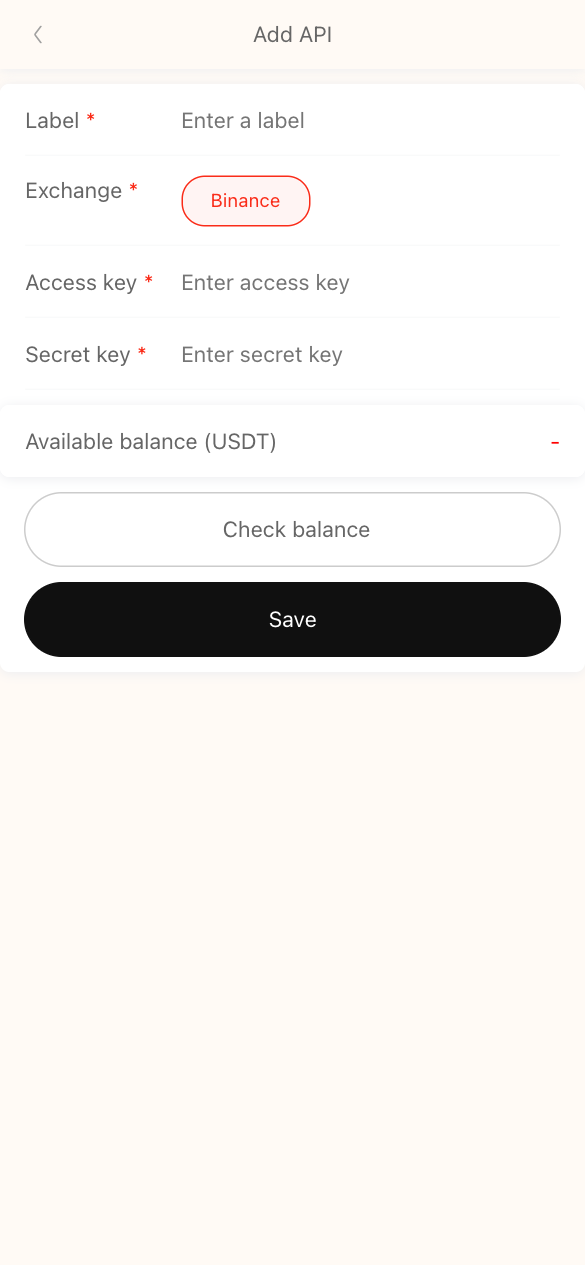
Add the connection
- Open Me → API management and add a connection.
- Select the exchange shown in your current App and give the connection a recognizable name, such as “My spot account”.
- Copy the AccessKey and SecretKey exactly, without extra spaces. Enter any additional passphrase only where the selected exchange requires one.
- Save, then use the available connection/balance check. Never screenshot unmasked credentials.
| Workflow | Check at the exchange |
|---|---|
| DCA spot buying | Read/account access and spot trading permissions; sufficient spot USDT |
| F&G futures | Supported USDT-margined futures permissions, futures balance and supported position mode |
| All workflows | Key validity, allowed server IP, account restrictions, correct live/test environment |
Do not enable withdrawals. Use a dedicated key for Bitpongo. If an exchange supports an IP allowlist, ask the operator for the current backend egress IP; your phone's IP is not the IP placing server-side orders.
Verify the result
The connection should appear in API management and be selectable when creating the relevant strategy. A successful spot balance query does not prove that futures trading works.
Common failures
- Invalid API key / IP / permissions: check all three independently. A server migration can require an IP allowlist update.
- Balance is zero: verify spot versus futures wallet and whether funds are locked in open orders.
- Minimum order rejected: allocation per coin, precision and current exchange minimums matter, not just the strategy's total amount.
- Key leaked: disable it at the exchange first, then replace the saved connection. Do not paste it into logs or support messages.
Continue with DCA, F&G or trade failure diagnosis.