Notification strength and confirmation
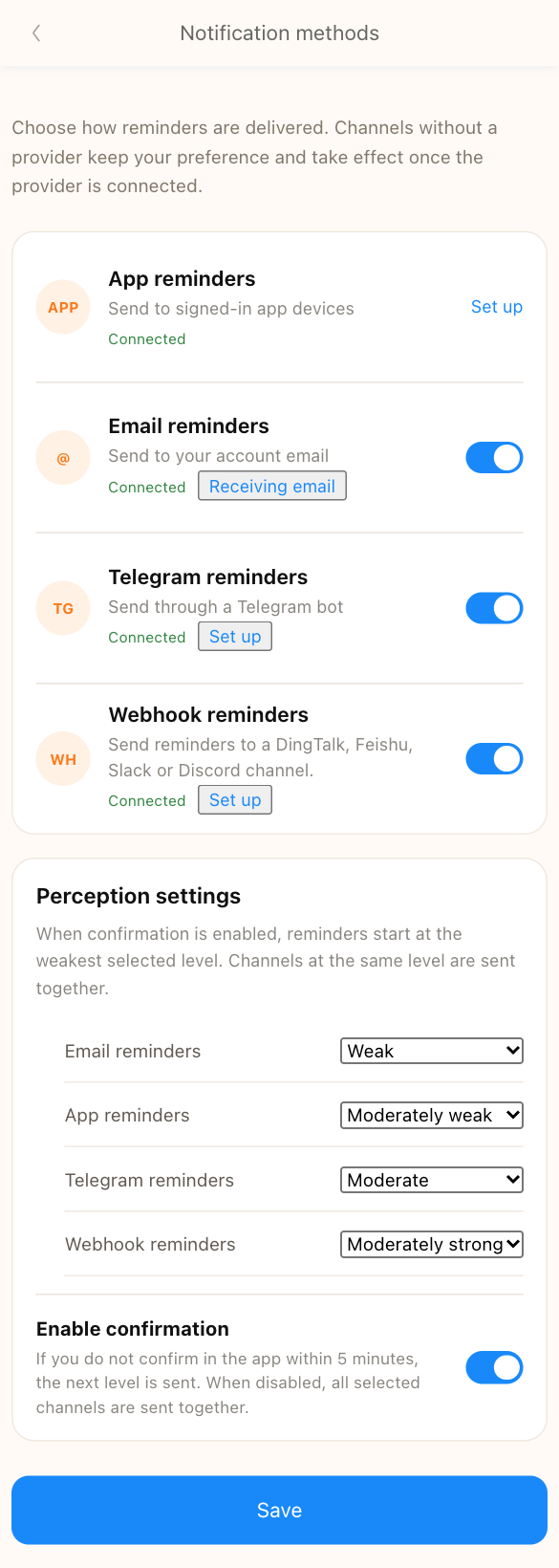
Configure strength
Open Me → Notification methods → Perception settings. Eligible channels are App, email, Telegram and Webhook. Assign one of five levels, from Weak → Moderate weak → Moderate → Moderate strong → Strong, then save. SMS/phone are not working delivery options in the current implementation.
The strength is an ordering rule—not a guarantee of ringtone volume, a critical-alert entitlement or bypassing iOS Focus. A channel also has to be available, configured, enabled and selected for that event where per-alert filtering applies.
With confirmation escalation enabled

- The event starts with the weakest eligible level.
- Channels at the same level are grouped into one wave.
- If the event is not explicitly confirmed within five minutes, the next stronger eligible wave is scheduled.
- Continue until confirmation or exhaustion of eligible levels. This is not “resend all channels every five minutes”.
Example: email=Weak and Webhook=Moderate. The first wave sends email. If still unconfirmed after five minutes, the next wave uses Webhook. A stronger Telegram channel, if configured and selected, follows after the next confirmation window. Network/provider retries can add delay; this is not an exact delivery-time SLA.
Without escalation
When confirmation escalation is disabled, eligible selected channels are grouped into one delivery wave instead of progressing through strength levels.
Confirm the right event
Open the inbox, inspect the message and use its explicit confirmation action. Opening the App, seeing a banner or marking an item read is not equivalent to confirmation. Confirmation prevents future waves, but cannot retract a message already accepted by a provider or an in-flight delivery.
If a channel is skipped, review its current availability, switch, recipient, strength and the alert's selected-channel scope. Do not assume an unrelated trade-success notification uses exactly the same confirmation workflow as an inbox alert.