Create and manage a DCA strategy
DCA is scheduled spot buying, not a guarantee of lower cost or positive returns. All figures below are examples, not recommendations.
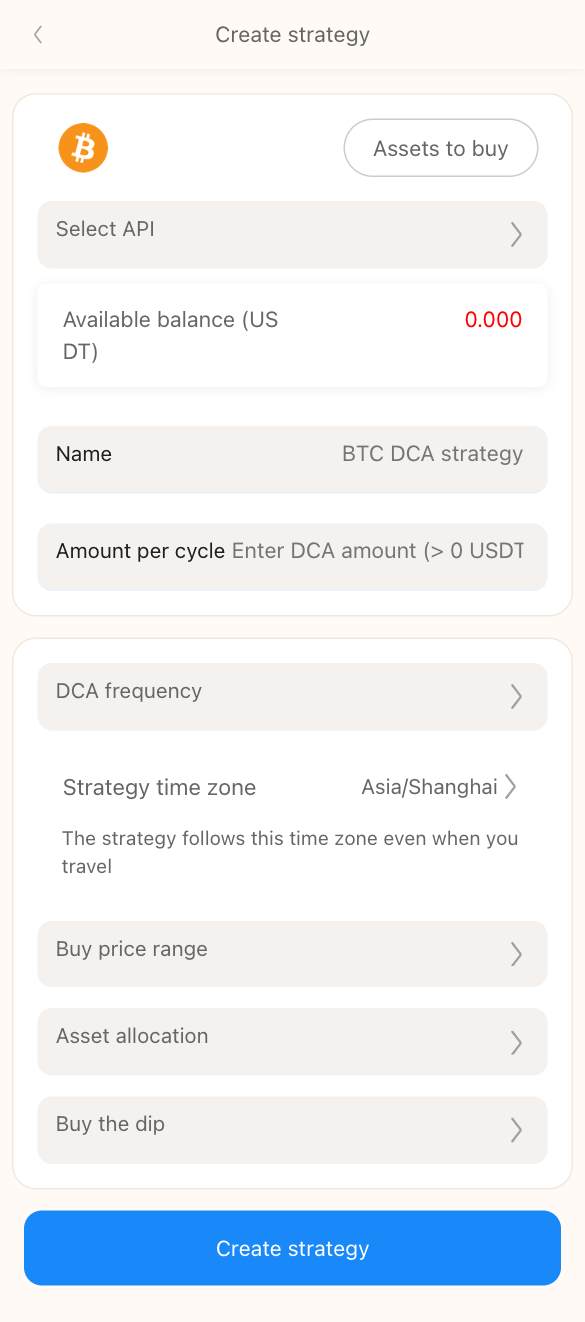
Create a plan
- Open List → Strategy → DCA strategy.
- Choose Assets to buy, select an API connection and enter a clear name.
- Set the amount per cycle, then configure the allocation for each asset. For example, 20 USDT split 50/50 produces two nominal 10 USDT allocations; exchange rounding and minimums still apply to each order.
- Choose the frequency and execution time. Review the strategy time zone, not just your phone's clock.
- Set a buy-price range only if needed. Buy the dip is optional; review its conditions before enabling it.
- Recheck available spot balance, allocation and exchange minimums before creating/enabling the strategy. Saving may enable automation—do not use live funds merely to explore the form.
| Setting | Meaning | What to check |
|---|---|---|
| Assets/allocation | How each cycle's amount is divided | Each resulting order must satisfy exchange limits |
| Amount per cycle | Budget for one scheduled cycle | Free balance must cover that cycle; locked funds are not free |
| Frequency/time | When the scheduler evaluates the plan | The strategy's saved time zone governs execution |
| Buy price range | A price gate for eligible buying | An out-of-range cycle is not necessarily an order failure |
| Buy the dip | Optional extra buying condition | Disabled is a valid configuration |
Execution time versus display time
A plan saved for 21:00 in Asia/Shanghai continues to run on that schedule when you travel. Display preferences may render the same instant in another zone. Do not change the strategy's zone just to change how history looks. Daylight-saving zones can change their UTC offset during the year.
Check what actually happened
Open List → Running → Strategy details. Compare Trade history with Execution records: a trigger/evaluation is not a filled order. Revenue/trend charts need recorded history and snapshots; zero data does not prove no trade occurred. Check the exchange's order history if results are uncertain.
Pause prevents future scheduled work; it does not undo fills. Stop is a strategy lifecycle action, not an instruction to sell all spot assets. Read the confirmation before proceeding.
If buying fails, check balance, permissions and minimums before resuming or retrying.